GitHub - nalgeon/redka: Redis re-implemented with SQL Redis re-implemented with SQL. Contribute to nalgeon/redka development by creating an account on GitHub. GitHub · github.com Redka a sick new redis compatable api, that uses sqlite as its backend datastore. It feels lightweight to use as it is a single small binary. Data does not have to fit into memory as it uses sqlite to store data.
Publishing rhythm
Today I learned how to VACUUM a sqlite database and cut its size in about half. It’s a database that I have had running for quite awhile and has some decent traffic on it.
Why is it important to do a VACUUM? In short its becuase the file system gets fragmented with as data is updated. On delete the files are removed from the database and marked as available for reuse in the filesystem, but the space is not reclaimed.
To VACUUM a database, run the following sql command. You can do it right form
the sqlite shell by running sqlite3.
You will need about double the current size of the database as free space to do the VACUUM, you need space for a full copy, journaling or write ahead logs, and the existing database.
VACUUM;
The docs are fantastic for vacuum.
Arch Linux - News: The xz package has been backdoored archlinux.org Check your system to see if you are vulnerable to the xz backdoor. I found this line most pertanent to me. The xz packages prior to version 5.6.1-2 (specifically 5.6.0-1 and 5.6.1-1) contain this backdoor. Also it appears that arch is not vulnerable as it does not directly link openssh to liblzma, so the known attack vecotor is not possible. read to the end of the linked article for more.
![[None]] Install it harpoon config
I learned that tailwind animations are pretty easy to add only needing a few classes. For some reason though my brain broke, thinking that I could dynamically change the number and you can’t cause there are only so many pre compiled classes without using an arbitrary value with brackets.
Here are the classes that I used to transition my colors very slowly.
<div id="square"
      class="transition-colors ease-in-out duration-700">
</div>
And the entire square element.
<div id="square"
      class="w-16 h-16 bg-rose-500 rounded border border-4 border-rose-800 hover:bg-indigo-600 hover:border-yellow-500 transition-colors ease-in-out duration-700">
</div>
I recently updated ollama, and it now installs a systemd service that I was not expecting. Seems like a great option, but I hadn’t expeted this and I was able to kill it previously. It was using up gpu, and I do other things on my machine with a gpu. I tried pkill, kill, and everything, it was still coming back.
No matter what it comes back
# stop it
systemctl stop ollama.service

# disable it if you want
systemctl disable ollama.service

# confirm its status
systemctl status ollama.service
You can confirm this with the following command.
# checking running processes
ps aux | grep ollama
pgrep ollama

# checking gpu processes
gpustat --show-cmd --show-pid
Next time you want to start you can do it as before with ollama serve.
I found this statement quite intriguing. multi-cursors are just macros. This is quite a philisophical video and mostly prime talking about the things that make vim vim, and what prime needs in and editor vs what he can live without.
Typer makes it easy to compose your cli applications, like you might with a web router if you are more familiar with that. This allows you to build smaller applications that compose into a larger application.
You will see similar patterns in the wild, namely the aws cli which always
has the aws <command> <subcommand> pattern.
Lets setup the cli app itself first. You can put it in project/cli/cli.py.
import typer

from project.cli.api import api_app
from project.cli.config import config_app
from project.cli.user import user_app
from project.cli.run import run_app

app = typer.Typer()

app.add_typer(api_app, name="api")
app.add_typer(config_app, name="config")
app.add_typer(user_app, name="user")
app.add_typer(run_app, name="run")
Creating an app that will become a command is the same as creating a regular app in Typer. We need to create a callback that will become our command, and a command that will become our subcommand in the parent app.
import typer
from rich.console import Console

from project.config import get_config

config_app = typer.Typer()

@config_app.callback()
def config():
    "model cli"


@config_app.command()
def show(
):
    project_config = get_config(env)
    Console().print(fokais_config)
Setting up the entrypoint in pyproject.toml.
[project.scripts] # <- this project is part of the config DO NOT change it
project = "project.cli.cli:app" # <- This project is the project name, DO change it
Now you can see each cli application as a sub command.
❯ project --help

 Usage: project [OPTIONS] COMMAND [ARGS]...

╭─ Options ─────────────────────────────────────────────────────────────────────────────────────────╮
│ --install-completion  [bash|zsh|fish|powershell|pwsh]  Install completion for the specified shell.│
│                                                        [default: None]                            │
│ --show-completion     [bash|zsh|fish|powershell|pwsh]  Show completion for the specified shell,   │
│                                                        to copy it or customize the installation.  │
│                                                        [default: None]                            │
│ --help                                                 Show this message and exit.                │
╰───────────────────────────────────────────────────────────────────────────────────────────────────╯
╭─ Commands ────────────────────────────────────────────────────────────────────────────────────────╮
│ api                        model cli                                                              │
│ config                     config cli                                                             │
│ user                       user cli                                                               │
│ run                        run cli                                                                │
╰───────────────────────────────────────────────────────────────────────────────────────────────────╯
In the example above we can run the command project config show to see the
current configuration of our project.
I learned not to fear the arbitrary size feature of tailwind. While building out reader.waylonwalker.com I kept getting content flowing off the screen, and struggling to keep it on the screen. I really felt that I should be able to do this with vanilla tailwind, but after some encouragement from Twitter I decided to lean on arbitrary values and it worked.
Don’t fear the arbitrary values.
<li class="max-w-[100vw]">
</li>
Learn more about using-arbitrary-values from their docs docs
Use an llm to automagically generate meaningful git commit messages I harper.blog This is pretty sick, I wanted this early on when I was making lockhart. I wanted to do the git hook thing but could not figure it out and did not know that was a hook that I could use. Git Hooked Then I remembered! Git hooks! Lol. Why would I have that in my brain - who knows! I asked claude again, and they whipped up a simple script that would act as a hook that triggers with the prepare-commit-msg event. This is awesome, cuz if you want to add a git message, you can skip the hook. But if you are lazy, you exclude the message and it will call the LLM. Simon Willison’s llm cli comes in clutch here, it has such a good intereface to allow a prompt to be piped in, but the system prompt be set by -s. I love hacking on projects, but often I am super bad at making commits that make sense. I completely relate to this statement, and this is why I am trying it.
Each time I go to set up npm I am frustrated by the errors saying that I don’t
have permission to npm i -g <package>, and it’s frustrating. And I forget
what I need to do to tell npm to install packages in a directory I own, and my
shell to look there so that I can use the executables.
mkdir ~/.npm-global
export NPM_CONFIG_PREFIX=~/.npm-global
export PATH=$PATH:~/.npm-global/bin
For the fix to remain persistent you need to put these two lines in your shell
profile like ~/.bashrc or ~/.zshrc.
export NPM_CONFIG_PREFIX=~/.npm-global
export PATH=$PATH:~/.npm-global/bin
If you are designing a website in dark mode the scrollbars can be finicky to match the theme. Here is a pretty sane default that looks nice without being obnoxiously contrast to the rest of the site.
    <style>
        ::-webkit-scrollbar {
            height: 1rem;
            width: 1rem;
        }

        ::-webkit-scrollbar-track {
            background-color: rgb(24 24 27);
        }

        body::-webkit-scrollbar-track {
            background-color: rgb(39 39 42);
        }

        ::-webkit-scrollbar-thumb {
            background-color: rgb(82 82 91);
        }

        ::-webkit-scrollbar-thumb:hover {
            background-color: rgb(113 113 122);
        }

        body::-webkit-scrollbar-thumb {
            background-color: rgb(82 82 91);
        }

        body::-webkit-scrollbar-thumb:hover {
            background-color: rgb(113 113 122);
        }

        ::-webkit-scrollbar-corner {
            background-color: rgb(39 39 42);
        }
    </style>
Want a rounded scrollbar thumb? add these styles.
::-webkit-scrollbar-thumb {
    border-radius: 0.25rem;
    border-radius: 9999px;
}

body::-webkit-scrollbar-thumb {
    border-radius: 0.25rem;
    border-radius: 9999px;
}
This makes a very nice looking default darkmode scrollbar.
One Day Build - Play Outside
Inspired by Adam Savage and his One Day builds on youtube. I often build things, and want to make them generally useful for others and over configure out of the gate. This project is purely for me inspired by a need I have. play-outside!How-To # This post will not directly show how to make a weather app, but document the process that I went through to make mine. It will show the tools that I used to make it, and the final result. The Situation # It often goes in our house ask dad while he is busy and he will probably just say yes without thinking much. This happens a lot when kids ask to go outside. I think sure, go for it, you will figure it out. Then my wife walks in and asks where they are, followed by, did you even check the weather, its -11 degrees outside right now. I need a tool for this decision making process Lungs # You we have a family of not the most heathly lungs, we have my wife with lung cancer, one lung missing, and kids with asthma. We need to account for temperature,…
External Link stackoverflow.com Its sad that this is not the accepted answer.
External Link stackoverflow.com This is how you fix the stupid corner section of a double scroll bar being white on a dark theme site. The question included an example image where you can see white squares everywhere there are horizontal and vertical scroll bars.
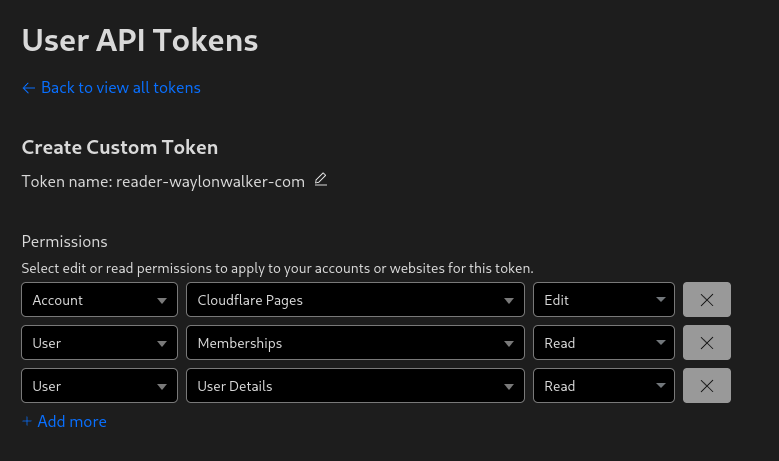
Before deploying to cloudflare pages with wrangler you need a cloudflare api token. You can get one at dash.cloudflare.com/profile/api-tokens.
Install Wrangler #
Next install wrangler using npm.
npm i -g wrangler
Create a Project #
Before you deploy to cloudflare pages you need to create a project. You might already have one, or you might want to create one in the webui, but you have the option to create it at the command line with wrangler.
npx wrangler pages deploy markout --project-name reader-waylonwalker-com --branch markout
Deploy #
Now you can deploy your static application using wrangler to cloudflare pages.
In this example I have my application built into the markout directory, and since the production branch is named
markoutI need to pass that in here as well.
wrangler pages deploy markout --project-name reader-waylonwalker-com --branch markout
This is an interesting problem. I want to make a solution for this on htmx -patterns. I would make user specific routes with an rather than serving the whole page, serve a partial with s to fill in user specific data with a no cache on the cdn level.
So cool to see ROX build this over the course of a day.
For my reader app I am using cronjobs to schedule my a new build and upload to
cloudflare pages every hour. In this example I have built a docker image
docker.io/waylonwalker/reader-waylonwalker-com and pushed it to dockerhub.
It uses a CLOUDFLARE_API_TOKEN secret to access cloudflare, and the
entrypoint itself does the build and upload.
apiVersion: v1
kind: Namespace
metadata:
  creationTimestamp: null
  name: reader
  namespace: reader

---
apiVersion: batch/v1
kind: CronJob
metadata:
  name: reader-cronjob
  namespace: reader
spec:
  schedule: "0 * * * *"
  successfulJobsHistoryLimit: 6
  failedJobsHistoryLimit: 6
  jobTemplate:
    spec:
      template:
        spec:
          containers:
            - name: reader-container
              image: docker.io/waylonwalker/reader-waylonwalker-com:latest
              env:
                - name: CLOUDFLARE_API_TOKEN
                  valueFrom:
                    secretKeyRef:
                      name: cloudflare-secret
                      key: cloudflare-secret
          restartPolicy: OnFailure
Looking for inspiration? DigitalHarbor by DigitalHarbor7. No description available.
I’m really excited about fastapi-observability, an amazing project by blueswen. It’s worth exploring! Observe FastAPI app with three pillars of observability: Traces (Tempo), Metrics (Prometheus), Logs (Loki) on Grafana through OpenTelemetry and OpenMetrics.
I am working on a page for htmx-patterns and I ran into a situation with lots of duplication. Especially when i am using tailwind I run into situations where the duplication can get tedious to maintiain. The solution I found is macros.
Now I can use the same code for all of my links, and call the macro to use it.
{% macro link(id, text, boosted=false) -%}
<a
    class="
    {% if id is none %}
      pointer-events-none bg-terminal-950 text-terminal-900 ring-terminal-900
    {% else %}
      bg-terminal-950 hover:bg-terminal-900 hover:text-terminal-400 text-terminal-500 shadow-lg shadow-terminal-300/20 hover:shadow-terminal-300/30 ring-terminal-300
    {% endif %}
      cursor-pointer block text-center font-bold py-2 px-4 rounded w-full ring-1
    "
    {% if id is not none %}
    href="{{ url_for('boosted', id=id) }}"
    {% endif %}
    {% if boosted %}
    hx-boost="true"
    {% endif %}>
    {{ text }}
</a>
{%- endmacro %}

<h2 class='text-3xl font-light mt-0 max-w-xl text-center prose-xl mt-8 text-terminal-500'>
    Boosted Links
</h2>

<div class='flex flex-row gap-4'>
    {{ link(prev_id, 'Previous', boosted=True) }}
    {{ link(next_id, 'Next', boosted=True) }}
</div>

<h2 class='text-3xl font-light mt-0 max-w-xl text-center prose-xl mt-8 text-terminal-500'>
    Normal Links
</h2>

<div class='flex flex-row gap-4'>
    {{ link(prev_id, 'Previous', boosted=False) }}
    {{ link(next_id, 'Next', boosted=False) }}
</div>
If you’re into interesting projects, don’t miss out on taipy, created by Avaiga. Turns Data and AI algorithms into production-ready web applications in no time.
jinja has a loop variable that is very handy to use with htmx. Whether you want to implement a click to load more or an infinite scroll this loop variable is very handy.
{% for person in persons %}
<li
{% if loop.last %}
    hx-get="{{ url_for('infinite', page=next_page) }}"
    hx-trigger="intersect once"
    hx-target="#persons"
    hx-swap='beforeend'
    hx-indicator="#persons-loading"
{% endif %}
    {{ person.name.upper() }} -
    {{ person.phone_number }}
</li>
{% endfor %}
Now for every chunk of contacts that we load we will trigger the infinite scroll by loading more once the last one has intersected the screen.
Out of the box FastAPI.">Starlette does not support url_for with query params. When trying to use url_for with query params it throws the following error.
starlette.routing.NoMatchFound: No route exists for name "infinite" and params "page"
In my searching for this I found starlette issue #560 quite helpful, but not complete, as it did not work for me.
import jinja2

if hasattr(jinja2, "pass_context"):
    pass_context = jinja2.pass_context
else:
    pass_context = jinja2.contextfunction

@pass_context
def url_for_query(context: dict, name: str, **params: dict) -> str:
    request = context["request"]
    url = str(request.url_for(name))
    if params == {}:
        return url
    from urllib.parse import parse_qs, urlencode, urlparse, urlunparse

    # Parse the URL
    parsed_url = urlparse(url)

    # Parse the query parameters
    query_params = parse_qs(parsed_url.query)

    # Update the query parameters with the new ones
    query_params.update(params)

    # Rebuild the query string
    updated_query_string = urlencode(query_params, doseq=True)

    # Rebuild the URL with the updated query string
    updated_url = urlunparse(
        (
            parsed_url.scheme,
            parsed_url.netloc,
            parsed_url.path,
            parsed_url.params,
            updated_query_string,
            parsed_url.fragment,
        )
    )

    if os.environ.get("ENV") in ["dev", "qa", "prod"]:
        updated_url = updated_url.replace("http", "https", 1)

    return updated_url

def get_templates():
    templates = Jinja2Templates(directory="templates")
    templates.env.globals["url_for"] = url_for_query
    return templates
https
If you want url_for to work in production you need some way to convert http
to https. Here is how I make it work, for local development I export ENV=local then for each environment that I am running on a server I include
it in the list and update ENV appropriately.
    if os.environ.get("ENV") in ["dev", "qa", "prod"]:
        updated_url = updated_url.replace("http", "https", 1)
The route might look something like this.
@infinite_router.get("/")
async def home(request: Request, page: int = 1, n: int = 10):
  ...
To access the home route using url_for in a jinja template you can use the
following, once you have applied the url_for_query function as your default
url_for
<a href="{{ url_for('home', page=1) }}">Home</a>
Kind (Kubernetes in Docker) is a tool that makes it easy to create and tear down local clusters quickly. I like to use it to test out new workflows.
Argocd is a continuous delivery tool that makes it easy to setup gitops workflows in kubernetes.
Here is how you can setup a new kind cluster and install argocd into it using helm, the kubernetes package manager.
kind create cluster --name argocd

# your first time through you need to add the argocd repo
helm repo add argo https://argoproj.github.io/argo-helm
helm repo update

# install argocd into the cluster
helm install argo argo/argo-cd --namespace argocd --create-namespace

# deploy the app of apps
kubectl apply -f apps/apps.yaml
If you want to add repos and apps to your cluster you can use the argo cli to do that, but first you will need forward the argocd port and login.
# Wait until Argo CD API server is available
echo "Waiting for Argo CD API server to be available..."
while ! kubectl wait --for=condition=available --timeout=60s deployment/argo-argocd-server -n argocd; do
  echo "Waiting for Argo CD API server to be ready..."
  sleep 10
done


kubectl port-forward svc/argo-argocd-server -n argocd 8080:443 &
argocd_admin_password=$(kubectl get secret argocd-initial-admin-secret -n argocd -o jsonpath="{.data.password}" | base64 -d)
argocd login localhost:8080 --insecure --username admin --password $argocd_admin_password
argocd repo add https://github.com/fokais-com/app.fokais.git --username waylonwalker --password ${GH_ARGO_PAT}
argocd app create app-fokais-local --repo https://github.com/fokais-com/app.fokais.git --path k8s/overlays/local --dest-server https://kubernetes.default.svc --sync-policy automated --sync-option Prune=true
External Link dotesports.com Damn this button had me stuck for way too long. It definitely looks like a button once I see it, but I don’t recall coming into contact with many buttons in the game, I tried to set it ablaze, pull it, fly it, nothing.
How can I add my YouTube videos via RSS? You can share your videos or other people SocialBee Help Documentation · help.socialbee.com YouTube makes finding rss feeds way too hard. Hats off to them for still supporting it, allowing you to find content outside the algorithm, and consuming content you asked for. But i had no idea you had to search the source code to get it.
feeds
I have several feeds that you can consume my content with. Many posts will cross between them, so if you would like to follow a certain stream of content in your rss reader thats what this is for. This one might feel like it has some extra noise with multiple posts per day, including starts, and instagram style posts, for a bit less look at the [[ main]] feed. TLDR If you are looking for everything look here https://waylonwalker.com/archive/rss.xml All # This is a feed of everything that I have published on my site to date including Posts tagged: blog, [[ til]], Thoughts, [[ stars]], Posts tagged: shots, [[ pings]]. web rss Main # Like the All feed, but drops the shots (instagram style posts) and stars (github stars). web rss til - daily(ish) # think gist with a tweet This is a feed of all of my TIL’s (Today I Learned). These are generally short single topic posts that I write up quickly. They are generally things that are fairly new to me, often things that I struggled to find support…
External Link stackoverflow.com Another interesting option for slow count queries in sqlite. If you haven’t DELETEd any records, doing:
Optimizing SQLite for servers SQLite is often misconceived as a "toy database", only good for mobile applications and embedded systems because it's default configuration is optimized for embedded use cases, so most... Sylvain Kerkour · kerkour.com Very interesting article by Sylvain, suggested by Simon Willison. Definitely some things that I want to come back and try later on. Here is the TLDR of the whole post This is interesting, and something I need to consider. I definitely have an application with slow count queries. I am not sure how to make it better as its not a full so a count table doesn’t work, nor does counting by index. I might need to have a table of cached results, and if a write matches the counter increase it, or update all counters on write. COUNT queries are slow SQLite doesn’t keep statistics about its indexes, unlike PostgreSQL, so COUNT queries are slow, even when using a WHERE clause on an indexed field: SQLite has to scan for all the matching records. One solution is to use a trigger on INSERT and DELETE that updates a running count in a separate table then query that separate table to find the latest count.
Inspiring story transitioning into tech from nursing. I also came to tech through a set of circumstances that made it difficult for me to excel at my current job. Looking back it is something that I was always interested in and I was just unsure how to get in, I am so glad that I figured it out, it has been such a great benefit to my family. I really enjoyed listening to trshpuppy’s journey in through building projects, and choosing tech not based on what she wanted to learn, but what fit the project the best.
Thoughts
These are generally my thoughts on a web page or some sort of url, except a rare few don’t have a link. These are dual published off of my thoughts.waylonwalker.com site. It’s a fully dynamically rendered site 2000’s style. Posts are stored in a database and instantly available. Almost all of the posts were written in a small field within a chrome extension that I built for it. These posts are intended to in two ways. One, link building for the author. I hope that I give the people helping me out along the way just a little bit of a boost. Two, they serve as a permanant commented bookmark for me to search, and come back to later when I have forgotten where I have seen something. web rss All thoughts posts cross posted to my site are prefixed with a thought balloon 💭. The tech # Since this blog is mostly a tech blog about software development, and my journey as I learn, lets talk tech. python fastapi htmx sqlite docker https://fly.io fastapi # The core of the site is a python web server…
I’m impressed by til from jbranchaud. 📝 Today I Learned
I came across Hexa from wyattbubbylee, and it’s packed with great features and ideas. Hexa is a game engine
Some Git poll results Some Git poll results Julia Evans · jvns.ca great poll of git questions poll: did you know that in a git merge conflict, the order of the code is different when you do a merge/rebase? merge: <<<<<<< HEAD YOUR CODE OTHER BRANCH’S CODE c694cf8aabe rebase: «««< HEAD OTHER BRANCH’S CODE YOUR CODE d945752 (your commit message) This one explains a lot. I think I knew this, I might have seen it somewhere, but I have definitely noticed it go both ways and confuse the crap out of me. Feels very similar to how and flip flops.
External Link sealed-secrets.netlify.app kubeseal is a pretty simple to get started with way to manage secrets such that they can be stored in a git repo and be picked up by your continuous delivery service. Sealed Secrets provides declarative Kubernetes Secret Management in a secure way. Since the Sealed Secrets are encrypted, they can be safely stored in a code repository. This enables an easy to implement GitOps flow that is very popular among the OSS community.
In my homelab kubernetes cluster I am using kubeseal to encrypt secrets. I have been using it successfully for a few months now wtih great success. It allows me to commit all of my secrets manifests to git with out risk of leaking secrets.
You see kubeseal encrypts your secrets with a private key only stored in your cluster, so only the cluster itself can decrypt them using the kubeseal controller.

KubeSeal #
https://sealed-secrets.netlify.app/
installation #
Installation happens in two steps. You need the kubernetes controller and the client side cli to create a sealed secret.
For a more complete instruction see the [docs#installation](https://github.com/bitnami-labs/sealed-secrets?tab=readme-ov-file#installation]
installation - controller #
Warning
context Make sure that you are in the right context before running any kubectl commands.
kubectl config current-context
sealed-secrets is installed using the helm package manager. To install sealed-secrets run the following command.
helm repo add sealed-secrets https://bitnami-labs.github.io/sealed-secrets
helm install sealed-secrets -n kube-system --set-string fullnameOverride=sealed-secrets-controller sealed-secrets/sealed-secrets
installation - client #
For the client you can check your OS package manager, brew, or the github-releases. For me I found it in the main arch repos.
paru -S kubeseal
# or
sudo pacman -S kubeseal
# or
brew install kubeseal
Note
You will need to install kubeseal on every device that you will want to create sealed secrets on.
Example #
Most of these commands come straight from the docs. From my experience I have always specified the namespace, my projects go per namespace and I don’t have any reason that other namepsaces should see the secret, and if they do I deploy another secret in that namespace.
# Create a json/yaml-encoded Secret somehow:
# (note use of `--dry-run` - this is just a local file!)
echo -n bar | kubectl create secret generic mysecret --dry-run=client --from-file=foo=/dev/stdin -o yaml -n thenamespace > mysecret.yaml
note that the key of the secret is
fooand the value isbar
results
apiVersion: v1
data:
  foo: YmFy
kind: Secret
metadata:
  creationTimestamp: null
  name: mysecret
  namespace: thenamespace
Note
The data is base64 encoded.
echo -n bar | base64
# YmFy
# This is the important bit:
kubeseal -f mysecret.yaml -w mysealedsecret.yaml

# At this point mysealedsecret.json is safe to upload to Github,
# post on Twitter, etc.

# Eventually:
kubectl create -f mysealedsecret.yaml -n thenamespace
# sealedsecret.bitnami.com/mysecret created

# Profit!
kubectl get secret mysecret
kubectl get secret mysecret -n thenamespace
# NAME       TYPE     DATA   AGE
# mysecret   Opaque   1      27s

cat mysealedsecret.yaml | kubeseal --validate
echo -n bar | kubectl create secret generic mysecret --dry-run=client --from-file=foo=/dev/stdin -o yaml \
  | kubeseal -o yaml -n thenamespace > mysealedsecret.yaml
echo -n baz | kubectl create secret generic mysecret --dry-run=client --from-file=bar=/dev/stdin -o yaml \
  | kubeseal -o yaml -n thenamespace --merge-into mysealedsecret.yaml
Results
---
apiVersion: bitnami.com/v1alpha1
kind: SealedSecret
metadata:
  creationTimestamp: null
  name: mysecret
  namespace: thenamespace
spec:
  encryptedData:
    bar: AgBLkamltcLfH1dC1JxQ3qd8lJ8aBZF2ARoq3uo055hnzXOy8g2T5liTx5UPvyPV8yyWqABU8eOnwjNhDtzSATvYeBB3fGkucdOZziWEoiNsWTR9ZtFEkod7Ya6uGkzZOJwi3IkrHFVIT9oWZQUxxJZ6vFhPiFcx9Dorr8TNSzG4KOug25+PhWPPiHDgSup5N3CkWCZaYOF7dbZRVSA4nGP1fZxjFByHP4AsdjLCHptyVbkpLRKeiXTkLxfLX4K+JLZGM41S1On5bSP56mCfv1daTJx619kDXkRLw9l21Ot283/L0NMNAiw781AefYMVoO3aHmYgcT6wAtsQAKje9fyL7DQRHt8a5NZOWukp/P6XjdXRz/nfQasQlbSTrRkDpplKIM5/WdPcBoKi+yyoOL0rZ8x1X7YzUI3BggZmzWyEPD01BK1YAHGZnYIZbbCy1JSm8JCBvP+xWMg+i0Z/DCD8nclAhH1GX2Q7/NrNHF//589AJfuriymd2+mk7uaLA4RRsY0l5QeZD6HVAqSv5jWsVQQtSftWmI9vn9oL/Pno7sEUjSDpXPfF4nnsULhxsPEe2DFAMm1kZAjdF06ueF4/x2Fdy80ZQNyycaDx2CWm4z3b14A75WGyOXl2wJZQqxrFCz8el4hD2nH3zQFEzd6AIh49myqVAGuu2qGlYP4p94LJghVa+mQjztLD/2ZUZjY+anQ=
    foo: AgAducXW6iUCY900cPDdmRfuj7tKnh2hY4C1+2hFoAtjyvjepsKNWsiPJ81t8anaMfFPat4ta060l5VtTrceFE8oS/rViz1tvNWGPBjL+GwL/QjkGl6H8ju87vKERKQn5qw7B/V5j24VM8AxOd+/vJNt/IeRIHLubvFft4hyMq4b0xmIxaemBSTxchQX/5364T3VJH2kHaqpqd+JJgQnTbiTQe/XnyZokDX8GSxw4rAbJUJSRUtY9DB9ZDu2zC5VngX+GJjbwHGbv9EKs8LShJIPrD8xHqrDmlSXGkkP01D4A6268Qoi3x5S0H5aqDgtrgBiWsNkzdKwjfrTNx7pKecOi41lyFdffHOGUew4aPPMqjzWR2TEms9WNNQXwnBdDHKMkFsisocF52BolEkcjF8g/u5h2Af92abMu6k16VybJrB7TV1set5A9W7rqG1iXI4+1W6XQfFnpja8xL/zJBvZcyHgeYMNaxa3C3s6PANhPzAUVaXV9eedAkptGJLN13IZj4LujpoAxRKo6bEdydv/5P23R3fx5PgTOpVI7riECAOIg2PThFsEoVCUwStmKCvIx1I2+YixIlv/OiaUWo4lrI/3ve5WGp4ZnuiJPk34JoYAlRbR6+sX14d8Ek6viq/pJUUIfVpNIkNMboUL4u+KpT47eyQ/mWih/KFduQyX9II/vQ+/IJGzEEHIipxAhdmV+K4=
  template:
    metadata:
      creationTimestamp: null
      name: mysecret
      namespace: thenamespace
backing up your sealing key #
kubectl get secret -n kube-system -l sealedsecrets.bitnami.com/sealed-secrets-key -o yaml >main.key
converting .env files to a secret #
Working with web applications .env is a common way to store credentials. Let’s look at how we can convert these to secrets.
kubectl create secret generic mysecret --from-env-file=.env -n thenamespace --dry-run=client -o yaml > mysecret.yaml
Now you have a secret that looks like this.
apiVersion: v1
data:
  foo: YmFy
kind: Secret
metadata:
  creationTimestamp: null
  name: mysecret
  namespace: thenamespace
Seal it up just like before.
kubeseal -f mysecret.yaml -w mysealedsecret.yaml
Using the secrets #
I typically use the secrets in the container spec.
containers:
  - name: myapp
    envFrom:
      - secretRef:
          name: mysecret
    # You can still have other env vars
    env:
      - name: foo
        value: bar
Sometimes I want to mount the secret as a volume.
containers:
  - name: myapp
    volumeMounts:
      - name: mysecret
        mountPath: /mysecret
volumes:
  - name: mysecret
    secret:
      secretName: mysecret
Image Pull Secrets #
I also need to use imagePullSecrets. Let’s walk through the whole process. Starting with the secret.
kubectl create secret docker-registry regcred --docker-server=myprivateregistry.example.com --docker-username=foo --docker-password=bar --dry-run=client -o yaml
Generates the following secret.
apiVersion: v1
data:
  .dockerconfigjson: eyJhdXRocyI6eyJteXByaXZhdGVyZWdpc3RyeS5leGFtcGxlLmNvbSI6eyJ1c2VybmFtZSI6ImZvbyIsInBhc3N3b3JkIjoiYmFyIiwiYXV0aCI6IlptOXZPbUpoY2c9PSJ9fX0=
kind: Secret
metadata:
  creationTimestamp: null
  name: regcred
type: kubernetes.io/dockerconfigjson

---
the secret
Now we we can seal that secret.
kubeseal -f regcred.yaml -w regcred-sealed.yaml
And that gives us the following sealed secret that we can deploy into our cluster.
---
apiVersion: bitnami.com/v1alpha1
kind: SealedSecret
metadata:
  creationTimestamp: null
  name: regcred
  namespace: default
spec:
  encryptedData:
    .dockerconfigjson: AgATYVEywkyYEaoErQbJo6xEZfOnRn1ydNTLkO3Jt/NF/UH+0o9lHpDecRpN0XnVu8xJUcdjkgD9q2XkwP8e6qQDS2mMPTiTNIN+8gbJx97WrD1YQDT0lXBuoyi9I/iwlXxx6MgH/6GY6CeGTz5SRlvoU0Xhlt4d11s7/xapdE8QMLsAReqPEv8oZHEyAxDRrjXX0V+tO8dV+G+GXjUDMBBceLael9rvGzSKIwDVXACVqQhLkB6FoP98M+yyBE46RBNnSnS0ShQM5PprL24HKpRZ43x4RM53KBrQ7R/MxeshafY+B6vUvrolmVox4sud8xngMOcjTO28LLOrck5V8ZiDabhN7ajHEf03IESr1o/ADGf5k9988Vv1txJtsZW0K2mpRu0D7/BLVL9KzbZ5ywULqIoD/Ur2GIGnZqMAKOq4laGp/GJtMKLrhmEvekT397wC/Gf/xdDKVhHf2p4ocsPu7LKFuS5H/Auel/Q5grdn8L5wwrO4VWRv3eJroKh/Hux7Qd7f64O7qdi0XthDocf+gmtjys+Gy72M7tyf8f/O+3oKbS4CWQVTj4ZThMc9znrFnHqt2q/7pAyytTQCpk51wlzOsNvOhCueJM/jmeahaL0LuBrqngqISpnd65sgVzBcZpwK9i2Fckyt0DrZLH+NoIuvaqNhzlF+OMbAft/ylWWKCH4WUP+FKG+1LXM7ud7AA3MMbGSBxHL0/WK/INa7MB56xZKMqqyvvLLQHFTQUROJjkgkzsumdOgwZTRgIFnAZ4+vOX3/1Rtt3mAs3vdoJhL4GuKUYCnEHt908eKkWEVEs7eMk5SdSRtIsbaXO2s0dtADwg==
  template:
    metadata:
      creationTimestamp: null
      name: regcred
      namespace: default
    type: kubernetes.io/dockerconfigjson
Now that we have our sealed registry secret, we can deploy it into our cluster.
kubectl apply -f regcred-sealed.yaml
Now we can use it to pull images from our private registry.
containers:
  imagePullSecrets:
    - name: regcred
Full example #
Here is a full deployment example using all the secrets we have created.
- regcred
- mounting a secret
- envFrom secret
---
apiVersion: apps/v1
kind: Deployment
metadata:
  creationTimestamp: null
  labels:
    service: myservice
  name: myservice
  namespace: mynamespace
spec:
  replicas: 1
  selector:
    matchLabels:
      service: myservice
  strategy:
    type: Recreate
  template:
    metadata:
      creationTimestamp: null
      labels:
        service: myservice
    spec:
      containers:
        - envFrom:
            - secretRef:
                name: mysecret
          env:
            - name: foo
              value: bar
          image: private-registry.io/myimage:1.0.0
          name: myimage
          ports:
            - containerPort: 5000
              protocol: TCP
          resources: {}
          volumeMounts:
            - mountPath: /mysecret
              name: mysecret
      restartPolicy: Always
      volumes:
        - name: mysecret
          secret:
            secretName: mysecret
      imagePullSecrets:
        - name: regcred
Downside #
Now the main downside I see with kubeseal is that it does not provide a way to store your secrets in a way that you can access outside of your cluster. So you need to make sure that you have another solution in place to store your secrets so that you still have them if you ever were to take the cluster down or move from k8s to something else.
Overall the likelyhood of you loosing a production cluster is pretty low, so maybe it’s ok to just trust it depending on what the secrets are. Especially for things you control and can rotate anyways its fine.
Just starred codemirror-codeium by val-town. It’s an exciting project with a lot to offer. Codeium code completion integration for CodeMirror 6
Great episode covering a seemingly simple topic. What I really benefitted from was hearing all the different use cases, from logging, debugging, to a/b testing, caching, and auth. I hadn’t even thought of it being applied to a router. I thought of it being applied for an entire application. This seems very useful for things like an admin router, all routes would need to have the admin role to get in.
![[None]] I’ve been using these decorators to modify the behavior of specific routes. It will do things like 404 admin only routes in a way that looks just like fastapi ’s default, or only allow certain roles into the route, or redirect unauthenticated users to login. After listening to yesterday’s syntaxfm I’m now really thinking about middleware and the benefits it might have. middleware would make it easy to apply things like admin to an entire admin router, so you wont forget it on any one admin route. It will look cleaner as the admin checker is only applied once per router, not once per route.
kubernetes 6 months in
I stumbled into kubernetes December 2023 when I was looking for a better way to self host applications. I was looking for something that didn’t require logging into a server and building and deploying like a cave man. I wanted a smoother experience than docker compose was giving me. https://waylonwalker.com/looking-for-a-heroku-replacement/ This post turned into a list of tools that I have adopted into my k8s workflow, and plan to keep. enjoy. Kompose # Kompose is a great tool for gettting going and converting your docker-compose to kubernetes manifests or helm templates. It was a great tool for me to get started with, but I was afraid that it was hindering me learning more and just blindly using its output so I have tried to use it less and less. I’m now not solely leaning on it, but using it to get out quick POCs with low friction. Kompose really helped me go 0 to 60 and get right into kubernetes with my existing docker compose files and very little change. I found it a great way to…
Simon Willison (@simonw) on X TIL Google Chrome has a --headless option you can use to take a screenshot from the CLI that's built into the default installation X (formerly Twitter) · twitter.com Huh, so this is just built right into the chrome cli.
![[None]] jinja’s in fastapi does not account for https by default, there is probably a better way, but this is a way that allows me to configure when I use http vs https.
@cassidoo) on X — I MADE AN APP ✨" loading="lazy"> Cassidy ( @cassidoo) on X I MADE AN APP ✨ X (formerly Twitter) · twitter.com Damn are one time paid and have it apps making a comeback? Seems like the perfect thing to have someone else automate and not pay a subscription for. Genius Idea Cassidy!! Now what do you call this, its not software as a service, is this just sofware?
![[None]]
Joining the split keyboards club: a Moonlander story | Carlos Becker This post will describe my experience with a couple of firsts: carlosbecker.com I switched from a 60% vortex pok3r to a 40% corne June, 2021. I can relate to a lot of what Carlos talks about here. I think going from 60%-40% made my journey harder than it needed to be. There’s no going back now, but it took me a really long time to be able to hit all of the numbers and symbols, just figuring out how to do the layout was hard there’s not much space. I didn’t touch type. I never really used my pinkies, except maybe for ESC, Shift, CTRL, Backspace et al. I can relate to this, my typing habits were terrible. Shortly before going split ortho I worked on my speed with lots, and lots of practice on keybr and monkeytype. I took my speed from 35wpm to 80wpm with a few months of steady practice. This is one of the best things I did for myself. Once I got split it dropped down to single digits and slowly rose back up to 80, just barely breaking my PB on monkeytype. I still feel like I still can’t type at my previous max speed — mostly because I wasn’t used to use my pinky and used the “wrong finger” for a lot of keys, but, ne…
My workflow, part 1 | Carlos Becker I keep getting asked how my setup works, how I use tmux and nvim over ssh… all that good stuff. carlosbecker.com Carlos has a pretty sick setup here, I can relate to mostly, cept the macos part. My main critique is that I don’t think he gave window managers much chance on linux, and they just don’t work on MacOS/Windows. Most of the time I have a single, maximized window. I can relate to this. I should really make a full post about my experience with tiling window managers. TLDR, I came for tiling and I stayed for the workspaces. Multiple Displays An exception here could be streaming: having multiple displays can help preventing doxing yourself if you only share the screen of one of them. I only did stream like 3 times and that’s what I did, but I’m sure experienced streamers have better workflows (with or without multiple displays). Accurate, my home machine uses one monitor, and for work I use one monitor+laptop. I pair, screenshare, and present quite a bit at work, and its good to have one screen for sharing, and one for seeing things like the app you are sharing from (chat, cams, etc)
strawberry-sqlalchemy by strawberry-graphql is a game-changer in its space. Excited to see how it evolves. A SQLAlchemy Integration for strawberry-graphql
I recently discovered AnyText by tyxsspa, and it’s truly impressive. Official implementation code of the paper <AnyText: Multilingual Visual Text Generation And Editing>