Check out stable-diffusion by CompVis. It’s a well-crafted project with great potential. A latent text-to-image diffusion model
Publishing rhythm
Deliberative #
People exceptionally talented in the Deliberative theme are best described by the serious care they take in making decisions or choices. They anticipate obstacles.
I am risk-adverse. I want everything well thought out and calculated before I make any sort of change. I have never gambled in my life and just the thought of it makes me anxious.
Aim it #
I can use this as a strength to plan out potential issues and prevent them. I do this quite often with my role in infrastructure.
I need to make sure that I use deadlines to keep this as a strength and not hinderence.
Automation #
One of the biggest ways that I utilize this skill is automation. I am all about automating things, not just because I don’t want to do the manual work, but I am not sure when I am going to need to do something again.
Check out archlinux and their project aur. ⚠️⚠️Experimental aur. git mirror⚠️⚠️ (read-only mirror)
A common meta thing that I need in python is to find the version of a package.
Most of the time I reach for package_name.__version__, but that does not
always work.
but not all projects have a __version__ #
In searching the internet for an answer nearly every one of them pointed me to
__version__. This works for most projects, but is simply a convention, its
not required. Not all projects implement a __version__, but most do. I’ve
never seen it lie to me, but there is nothing stopping someone from shipping
mismatched versions.
If you maintain a project ship a __version__ #
I appreciate it
While its not required its super handy and easy for anyone to remember off the
top of their head. It makes it easy to start debugging differences between
what you have vs what you see somewhere else. You can do this by dropping a
__version__ variable inside your __init__.py file.
## __init__.py
__version__ = 1.0.0
SO #
stack overflow saves the day
Special thanks to this Stack Overflow post for answering this question for me.
So what do you do… #
importlib
Your next option is to reach into the package metadata of the package that you are interested in, and this has changed over time as highlighted in the stack overflow post.
for Python >= 3.8:
from importlib.metadata import version

version('markata')
# `0.3.0.b4`
I only really use python >= 3.8 these days, but if you need to implement it for an older version check out the stack overflow post.
Another option.. #
use the command line
Another common option uses pip at the command line.
❯ pip show markata
Name: markata
Version: 0.3.0b4
Summary: Static site generator plugins all the way down.
Home-page: https://markata.dev
Author: Waylon Walker
Author-email: [email protected]
License: MIT
Location: /home/waylon/git/waylonwalker.com/.venv/lib/python3.11/site-packages
Requires: anyconfig, beautifulsoup4, checksumdir, diskcache, feedgen, jinja2, more-itertools, pathspec, pillow, pluggy, pymdown-extensions, python-frontmatter, pytz, rich, textual, toml, typer
Required-by:
And if the package implements a command line its common to ship a version
command such as --version or -V.
❯ markata --version
Markata CLI Version: 0.3.0.b4
Why did I need to do this? #
Well we have a cli tool that wraps around piptools and we wanted to include the
version of piptools in the comments that it produces dynamically. This is why
I wanted to dynamically grab the version inside python without shelling out to
pip show. Now along with the version of our internal tool you will get the
version of piptools even though piptools does not ship a __version__
variable.
Fin #
In the end, I am glad I learned that its so easy to use the more accurate
package metadata, but still appreciate packages shipping __version__ for all
of us n00b’s out here.
Check out gum by charmbracelet. It’s a well-crafted project with great potential. A tool for glamorous shell scripts 🎀
Check out crossposter by Mr-Destructive. It’s a well-crafted project with great potential. Crosspost your articles to dev.to, codenewbie.org, medium.com and hashnode.com with a single shellscript / python package
The one reason I switched to arch
The community, that’s it, end of post, roll the credits. I’m a tinkerer # I am a tinkerer, I am not going to run a stock desktop manager, mostly becuase that’s just not how my brain works. I need to tweak everything to fit my needs. Grantid I have not spent much time in many full fledged linux desktop environments. They are far more customizable than windows ever will be, I absolutely love that about them. Inevitibly I end up in a situation where I hit a wall, it just won’t do what I want it to do, or my lack of understanding what came wtih it holds me back. minimal # I love minimal installs. I love just building up my system from the bottom up with things that I like, I understand, and that I can script. I’m a noob # I spend a lot of my time in the terminal. I’d like to think I know how to use a linux command line for software development really well, but there are a lot of things that I still dont know all that well, mostly because I don’t need to. The AUR # Arch’s community maintain…
Just starred moonlight-qt by moonlight-stream. It’s an exciting project with a lot to offer. GameStream client for PCs (Windows, Mac, Linux, and Steam Link)
I recently discovered moonlight-docs by moonlight-stream, and it’s truly impressive. Moonlight Documentation
I like deresmos’s project xrandr-manager. Manage dual display on Linux
If you’re into interesting projects, don’t miss out on xpadneo, created by atar-axis. Advanced Linux Driver for Xbox One Wireless Controller (shipped with Xbox One S)
I came across Launcher-Curseforge from ShayBox, and it’s packed with great features and ideas. Integrates the CF Modpack install button to any MMC based launcher

Recently I added two new bash/zsh aliases to make my git experience just a tad better.
trackme #
Most of our work repos were recently migrated to new remote urls, we scriped
out the update to all of the repos, but I was left with a tracking error for
all of my open branches. To easily resolve this I just made an alias so that I
can just run trackme anytime I see this error.
There is no tracking information for the current branch.
    Please specify which branch you want to merge with.
    See git-pull(1) for details

    git pull <remote> <branch>

If you wish to set tracking information for this branch you can do so with:

    git branch --set-upstream develop origin/<branch>
getting the branch #
The following command will always return the currently checked out branch name.
git symbolic-ref --short HEAD
Injecting this into the suggested git command as a subshell gives us this
alias that when ran with trackme will automatically fix tracking for my
branch.
alias trackme='git branch --set-upstream-to=origin/$(git symbolic-ref --short HEAD)'
rebasemain #
I sometimes get a bit lazy at checking main for changes before submitting any prs, so again I made a quick shell alias that will rebase main into my branch before I open a pr.
alias rebasemain='git pull origin main --rebase'
The Aliases #
Here are both of the alias’s, feel free to steal and modify them into your
dotfiles. If you are uniniatiated a common starting place to put these is
either in your ~/.bashrch or ~/.zshrc depending on your shell of choice.
alias trackme='git branch --set-upstream-to=origin/$(git symbolic-ref --short HEAD)'
alias rebasemain='git pull origin main --rebase'
Check out pip-tools by jazzband. It’s a well-crafted project with great potential. A set of tools to keep your pinned Python dependencies fresh.
So many terminal applications bind q to exit, even the python debugger, its
muscle memory for me. But to exit ipython I have to type out exit<ENTER>.
This is fine, but since q is muscle memory for me I get this error a few times
per day.
╭─────────────────────────────── Traceback (most recent call last) ────────────────────────────────╮
│ <ipython-input-1-2b66fd261ee5>:1 in <module>                                                     │
╰──────────────────────────────────────────────────────────────────────────────────────────────────╯
NameError: name 'q' is not defined
After digging way too deep into how IPython implements its ExitAutoCall I
realized there was a very simple solution here. IPython automatically
imports all the scripts you put in your profile directory, all I needed was to
create ~/.ipython/profile_default/startup/q.py with the following.
q = exit
It was that simple. This is not a game changer by any means, but I will now
see one less error in my workflow. I just press q<Enter> and I am out,
without error.
It’s no secret that I love automation, and lately my templating framework of
choice has been copier. One hiccup I recently ran into was having spaces in my
templated directory names. This makes it harder to run commands against as you
need to escape them, and if they end up in a url you end up with ugly %20 all
over.
Cookiecutter has the solution #
Yes the solution comes from a competing templating framework.
I install copier with pipx, so I need to inject cookiecutter in to my copier environment to use the slugify filter.
pipx inject copier cookiecutter
If you are using a normal virtual environment you can just pip install it.
pip install copier cookiecutter
add the extension to your template #
copier.yml
Now to enable the extension you need to declare it in your copier.yml file in
your template.
_jinja_extensions:
    - cookiecutter.extensions.SlugifyExtension
Use it | slugify #
use-it
Now to use it, anywhere that you want to slugify a variable, you just pipe it into slugify.
❯ tree .
.
├── copier.yml
├── README.md
└── {{ site_name|slugify }}
    └── markata.toml.jinja

1 directory, 3 files
Here is a slimmed down version of what the copier.yml looks like.
site_name:
  type: str
  help: What is the name of your site, this shows in seo description and the site title.
  default: Din Djarin

_jinja_extensions:
    - cookiecutter.extensions.SlugifyExtension
Results #
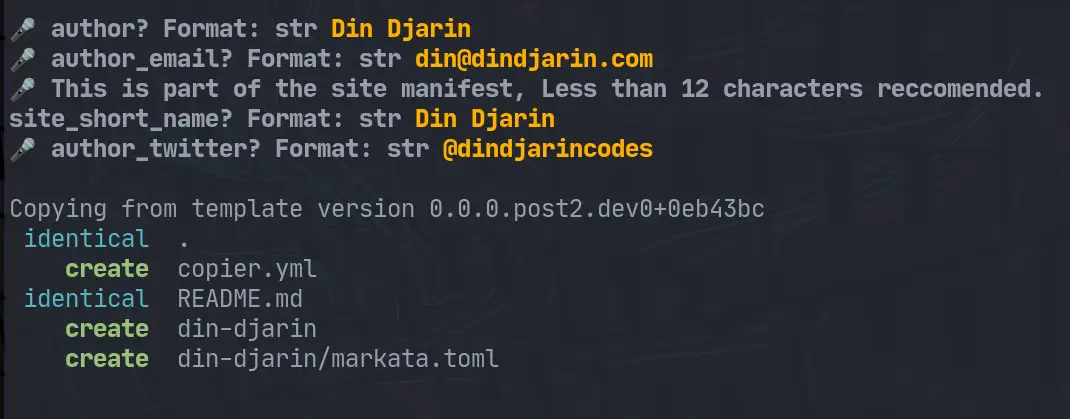
Running the template looks a bit like this.
straight from their docs #
The next section is straight from the cookiecutter docs
Slugify extension #
The cookiecutter.extensions.SlugifyExtension extension provides a slugify
filter in templates that converts string into its dashed (“slugified”) version:
{% "It's a random version" | slugify %}
Would output:
it-s-a-random-version
It is different from a mere replace of spaces since it also treats some special
characters differently such as ' in the example above. The function accepts
all arguments that can be passed to the slugify function of
python-slugify_. For example to change the output from
it-s-a-random-version to it_s_a_random_version, the separator parameter
would be passed: slugify(separator='_').
I came across box-cli-maker from box-cli-maker, and it’s packed with great features and ideas. Render highly customizable boxes in the terminal
box-cli-maker by Delta456 is a game-changer in its space. Excited to see how it evolves. Make Highly Customized Boxes for CLI
Textual has devtools in the upcoming css branch, and its pretty awesome!
It’s still early #
Textual is still very early and not really ready for prime time, but it’s quite amazing how easy some things such as creating keybindings is. The docs are coming, but missing right now so if you want to use textual be ready for reading source code and examples.
On to the devtools #
As @willmcgugan shows in this tweet it’s pretty easy to setup, it requires having two terminals open, or using tmux, and currently you have to use the css branch.
https://twitter.com/willmcgugan/status/1531294412696956930
Why does textual need its own devtools #
Textual is a tui application framework. Unlike when you are building cli applications, when the tui takes over the terminal in full screen there is no where to print statement debug, and breakpoints don’t work.
getting the css branch #
In the future it will likely be in main and not need this, but for now you need to get the css branch to get devtools.
git clone https://github.com/Textualize/textual
git fetch --alll
git checkout css
install in a virtual environment #
Now you can create a virtual environment, feel free to use whatever virtual environment tool you want, venv is built in to most python distributions though, and should just be there.
python3 -m venv .venv --prompt textual
source .venv/bin/activate
pip install .
Now that we have textual installed #
Once textual is installed you can open up the devtools by running textual console.
textual console

I’m really excited about minesweeper, an amazing project by NotUnlikeTheWaves. It’s worth exploring! A minesweeper in the terminal written in Golang with Bubbletea