External Link printables.com Someone has created a knock off of the ltt screwdriver and made it printable, and it works really well. I have one printed with 6 different bitholders. I popped some labels on them in bambu studio as I printed to mark them for metric/inch and so on. I’ve had mine for about a year now, and I use it quite often. I used to be a dedicated screwdriver kind of guy, but as life has changed I’m not working out of a shop with tools at reach as much, I’m grabbing a couple of items and heading to a job in the house or a neighbors house. It’s not 30s to grab just the right dedicated screwdriver anymore. Also having some setup with hex and torx is a game changer. It’s also super handy that you can just pop the bits right into a drill or impact. Highly recommended print. Sorry for not buying the real deal Linux, I got kids to feed here. I owe you a t-shirt order or something.
Publishing rhythm
Installing and managing Python | uv A guide to using uv to install Python, including requesting specific versions, automatic installation, viewing installed versions, and more. docs.astral.sh now can install python for you. is inspired by rust’s cargo, an all in one fast package and installation manager. is so fast and becoming feature complete, it’s really changing the python packaging ecosystem.
Switching configs in Neovim How to maintain multiple Neovim configurations and switch between them Michael Uloth · michaeluloth.com Switching between nvim configs can be really easy to do since they implemented the Environment Variable. Now config will be loaded from Michael lays out some aliases in the full article.
I recently discovered kickstart.css by tjdevries, and it’s truly impressive. Kickstart.nvim alternative written in pure CSS. Requires failwind.nvim
infused-kim has done a fantastic job with kb_zmk_ps2_mouse_trackpoint_driver. Highly recommend taking a look. A PS/2 mouse & trackpoint driver module for keyboards running the zmk firmware
I recently discovered failwind.nvim by tjdevries, and it’s truly impressive. KEKW
New-caps-for-porta-john
Today I dropped some new caps in the porta-john. I need to do a bunch of posts on zmk and my journey building the porta-john, I’ve been rocking it for at least two weeks now pretty solid and I am absolutely loving it. More on that later. KLP-Lame-Keycaps # The model of the caps are KLP-Lame by braindefender, they are super rounded and smooth. They look really good on camera and feel good to the finders. I printed these at home on my ender3 s1 pro with a black and purple silk filliment. I printed all 42 at once using a Printing 42 keys at once technique. They do have just a bit of a rough texture that you can feel on your figertips. I printed these on super quality.12mm layer height, while my last set was printed on draft quality.32mm layer height. They look crazy different in print quality with the lines of the new caps barely showing, the feel isn’t nearly as drastic. The Result # Check out the final shots as I set up the porta-john with these sweet caps. And here they are all set up.…
This is the coolest scrappy build, no printer or modeling required, no fancy tools, just straight chisel and claw hammer in soft pine. Im here for it, create the thing that you want to create.
Vim has a handy feature to format text with gq. You can use it in visual
mode, give it a motion, or if you give it gqq it will format the current line.
I use this quite often while writing in markdown, I do not use softwraps in vim,
so gqq quickly formats my current line into a paragraph. Once I have done
this for a single line one time I typically switch to the motion for around
paragraph gqap to format the whole paragraph and not just the current line.
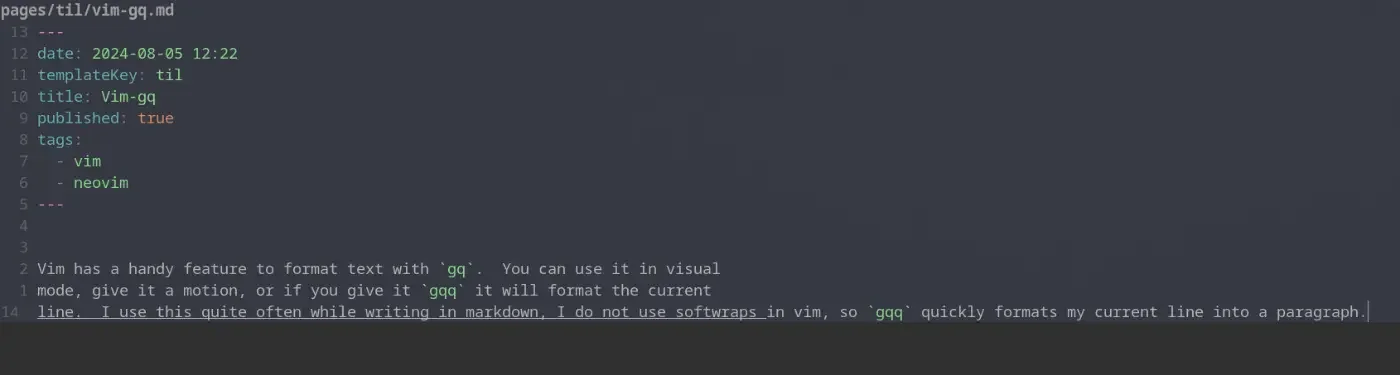
before formatting #
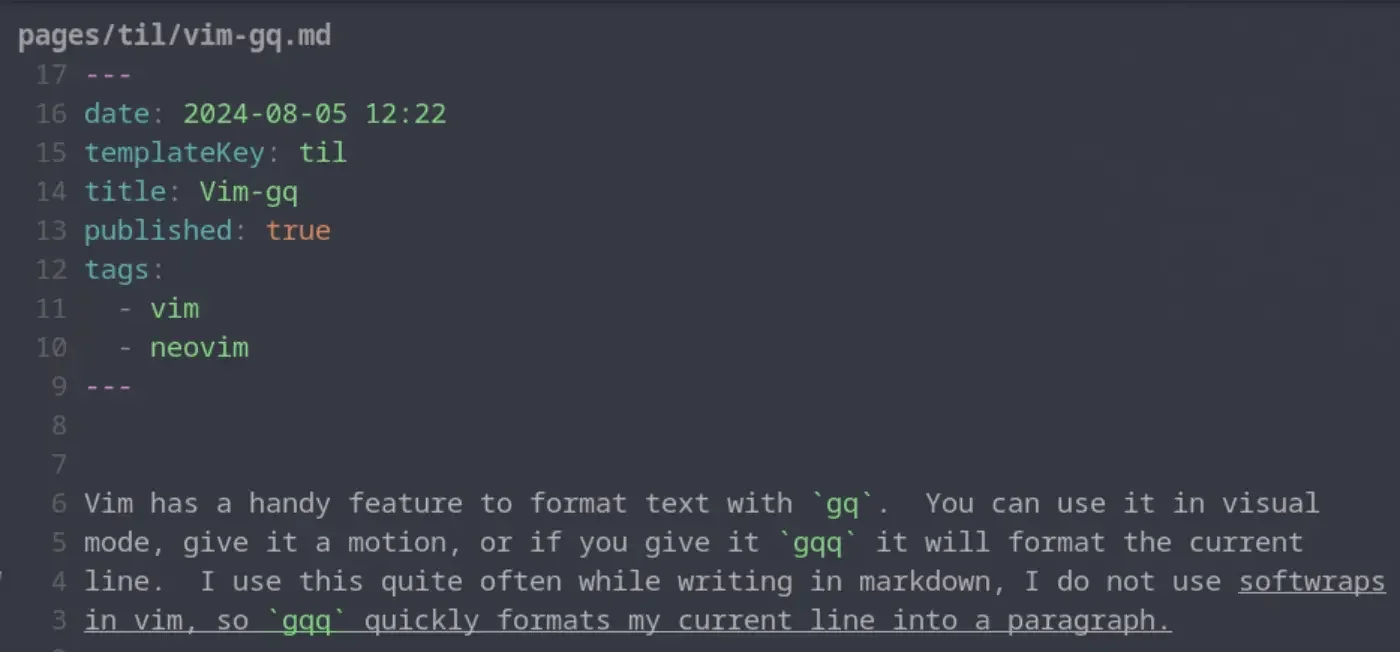
after formattting #
A slug is the part of the url that comes after the domain. Commonly matches the file name of a markdown file many blogging systems. These are typically human readable, unique identifiers for pages within the site.
Wikilinks are a core concept within obsidian to link to documents by Slug wrapped in double square brackets. These are commonly used within wiki site generators.
[[slug]]
Obsidian gives you a keybinding alt+enter to go to that file, but if it does not exist it will create the file for you in the root of the project. It’s a nice way to quickly make new documents.
blogging in 2024
Over the past years couple of years blog traffic has been tanking, for some time I thought it might have just been me, but then i heard it from Dave Rupert on Shop Talk show, and it made sense. LLMs and AI is slowly killing the internet as we know it. My metrics # I dug into my emails from the google search console team and found two results nearly one year apart. Impressions are only 60% of its value a year ago while clicks are only 35% of where they were a year ago. I’m getting less impressions and even less clicks. Suspicions # What I think is happening is a large portion of users are getting their answers from ChatGPT, Copilot, and llms like this. A lot of my posts have been filling gaps in the internet, notes for myself when I struggle to integrate x in y because there was a gap of how to do so in the docs and stack overflow. Some small fraction of users have moved on to duck duck go and other non global warming search engines with AI in their results. Clicks are down even further…
Hotkey to open link under at the text cursor position while typing in edit mode I find myself not wanting to leave the keyboard for navigation and think a keyboard-only shortcut that could open a link at the text cursor position is at would be really handy for this case. Obsidian Forum · forum.obsidian.md Obsidian has a go to definition like feature, the keybind is alt+enter, I would have never guessed this one.
It was not obvious to me, but if you have a wikilink such as Trying Obsidian, you can jump to the file in obsidian, just like you can with lsp go to definition, the keybinding is alt + enter.
The work on KLP-Lame-Keycaps by braindefender. Sculpted and curved keycaps for Kailh Choc and MX switches
Very inspiring video Jason, these people faced adversity and crushed it. The market is so hard right now, its not easy to get a job, move around, and recover from a layoff. Everyone in this video just showed that you can make it in this industry right now, you just have to be willing to work harder than the rest. The bar is raising, a lot of great people are already putting in hard work to make it. Community is Key, Theo mentioned that a lot of the companies he works with don’t even post openings, they go to their community first and are often filling spots through lower risk community hires.
This is such a cool 3d printed cornhole game.
Thor always comes in hard with fire takes in his shorts. Especially if you are early in our career take this in. If you dont yet have kids, but plan to, double take this in.
I’ve long used copier to create all of my posts for my blog, and it works really well for my workflow. I think of a title, call a template, and give it a title. out of the box obsidian did not seem to work this way. It seems like it wants me to right click a file tree and make a new file using the tree, this is not my jam.
Here is what I came up with to replace my til template.
---
date: <% tp.file.creation_date() %>
templateKey: til
title: <%*
  const originalFileName = await tp.system.prompt("Enter file name");
  const toTitleCase = str => str.replace(
    /\w\S*/g,
    txt => txt.charAt(0).toUpperCase() + txt.substr(1).toLowerCase()
  );
  const title = toTitleCase(originalFileName);
  tR += title + '\n'; // Add the title to the template result
-%>
published: true
tags:
  -
---
<%*
const fileName = originalFileName.toLowerCase().replace(/\s+/g, '-');
const newFilePath = `pages/til/${fileName}`;
await tp.file.move(newFilePath);
-%>

<% tp.file.cursor() %>
tRis a return value, and it gets placed directly into the place it is in the fileto.file.cursor()creates a tab-index point so I can tab into the content