Drafts

Draft and unpublished posts

0 posts simple view

Finding hidden files using Telescope as you fuzzy file finder is not too hard, its a single flag passed in. Then it will use whichever file finder it can find [‘fd’, ‘fdfind’, ‘rg –files’, ‘find’, or ‘where’] in that order. These tools each have their own way of handling hidden files, but telescope takes care of that so all you need to do is pass in hidden=true.

I have this keymap set to help me list out all files including hidden files using the pnumonic go edit hidden. I use ge for quite a few different things to take me directly to a specific file or picker.

nnoremap geh <cmd>Telescope find_files hidden=true<cr>

see the implementation telescope finds your files.

Lately I’ve been on a journey to really clean up my dotfiles, and I was completely missing fonts. I noticed jumping into a new vm I had a bunch of broken devicons when using Telescope with the devicons plugins.

This is one of those things that can be a total pain to get right on some systems, and it’s so nice when it’s just there for you pretty much out of the box.

  1. make sure your user fonts directory exists
  2. chech if the font you want exists on your machine
  3. download and unzip fonts into the fonts directory
  4. repeat 2-3 for all the fonts you use on your system
- name: ensure fonts directory
  file:
    path: "{{ lookup('env', 'HOME') }}/.fonts"
    state: directory

- name: Hack exists
  shell: "ls {{ lookup('env', 'HOME') }}/.fonts/Hack*Nerd*Font*Complete*"
  register: hack_exists
  ignore_errors: yes

- name: Download Hack
  when: hack_exists is failed
  ansible.builtin.unarchive:
    src: https://github.com/ryanoasis/nerd-fonts/releases/download/v2.1.0/Hack.zip
    dest: "{{ lookup('env', 'HOME') }}/.fonts/"
    remote_src: yes

https://www.youtube.com/watch?v=2MEmsinxRK4

I made a YT based on this post

Setup a yaml schema | yamlls for a silky smooth setup

check out how I install yamlls using ansible

Part of my neovim setup requires having the black python formatter installed and callable. I install it with pipx so that I don’t have to manage a virtual environment and have it available everywhere. So far this works well for me, if there are ever breaking changes I may need to rethink this.

re-installing a bunch of things that are already installed can be quite a waste and really add up to my ansible run time, so for most of my ansible tasks that install a command like this I have been following this pattern.

  1. check if the command is installed with command -v <command>
  2. register that step
  3. ignore if that step fails
  4. add a when: <xxx>_exists is failed condition to the step that installs that command.
- name: check is black installed
  shell: command -v black
  register: black_exists
  ignore_errors: yes

- name: install black
  when: black_exists is failed
  shell: pipx install black

https://www.youtube.com/watch?v=MCFg6-W5SBI

I made a video based on this post, check it out if its your thing

Adding a __render__ method that returns a rich renderable to any python class makes it display this output if printed with rich. This also includes being nested inside a rich Layout.

import rich
from rich.panel import Panel


class ShowMe:
    def __rich__(self):
        return Panel("hello", border_style="gold1")


if __name__ == "__main__":
    rich.print(ShowMe())
results of printing ShowMe with rich

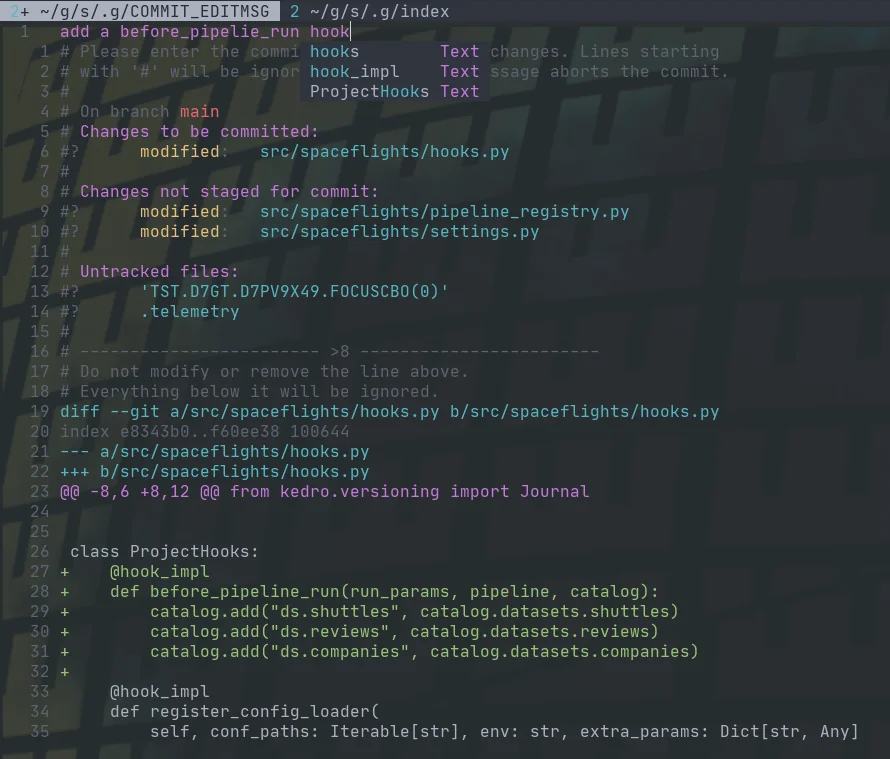
Fugitive comes with a pretty sick way to commit files and see the diff at the same time with verbose commit. Opening the fugitive menu with :G brings up your git status, you can stage files with s, unstage them with u, toggle them with -, and toggle their diff with >. Once you have staged your files for commit, you can commit with cc, but today I found that you can commit verbose with cvc. This brings up not only a commit widow with your git status shown, but the diff that you are about to commit.

fugitive verbose commit example

example of a verbose commit in fugitive

Kedro Course

- find all nodes with raw in the name - use parameters - make and use a logger - use find-kedro in spaceflights - slide in a new node - vizualize your pipeline - find slow nodes - move the configuration directory - build kedro into docker and run it - pyinstrument - pdb - make a new cli command - make a hook - load catalog entries - slice a pipeline - by tag - by name - from inputs - to outputs
1 min read

Uses

This is a listing of all the things that I use on a daily basis to build data pipelines, lead my team, and build this website. older editions # [1] [[ uses-2021 ]] Installation # [2] Everything installed on my machines is done through ansible-playbooks. It’s been a long transformation to get here, but its so satisfying to boot a brand new system, run a single command a have every single thing cofigured exactly to my liking. # GET is available by default on Ubuntu GET waylonwalker.com/bootstrap | bash # For debian based systems without GET by default sudo apt install curl curl -F https://waylonwalker.com/bootstrap | bash OS # [3] I run Ubuntu, it works well for me without too much fuss. For me the distribution does not really matter too much, I’m more interested in what’s inside. Window Manager # [4] I use awesome wm. Awesome is a tiling window manager that alows me to navigate through 9 workspaces (technically called tags in awesomewm). I can script out certain applications...

Update Alternatives in Linux

update-alternatives --query python update-alternatives: error: no alternatives for python sudo update-alternatives --install /usr/local/bin/python python `which python3.8` 2 # update-alternatives: using /usr/bin/python3.8 to provide /usr/local/bin/python (python) in auto mode sudo update-alternatives --install /usr/local/bin/python python `which python2.7` 5 # update-alternatives: using /usr/bin/python2.7 to provide /usr/local/bin/python (python) in auto mode update-alternatives --query python # Name: python # Link: /usr/local/bin/python # Status: auto # Best: /usr/bin/python2.7 # Value: /usr/bin/python2.7 # # Alternative: /usr/bin/python2.7 # Priority: 5 # # Alternative: /usr/bin/python3.8 # Priority: 2 sudo update-alternatives --install /usr/local/bin/python python `which python3.8` 20 # update-alternatives: using /usr/bin/python3.8 to provide /usr/local/bin/python (python) in auto mode

Using Nix to manage my Python Interpreter

I recently started playing with nix. goals # [1] - automatically select correct python version per project - activating one doesn’t bleed into the other Installing nix # [2] curl -L https://nixos.org/nix/install | sh controlling nix-env # [3] nix-env -iA nixpkgs.python310 nix-env -iA nixpkgs.python39 nix-env -iA nixpkgs.python38 nix-env -iA nixpkgs.python37 searching for packages # [4] https://search.nixos.org/ nix-env -qaP .\*python.\* nix search nixpkgs python shell # [5] nix-shell -p python39 References: [1]: #goals [2]: #installing-nix [3]: #controlling-nix-env [4]: #searching-for-packages [5]: #shell
1 min read

How I deploy my blog in 2022

How I Continuously Deliver Content to my Blog with Markdown, GitHub, Python, and netlify # [1] Content at the speed of thought. well, as fast as I can type Me # [2] - Mechanical Engineering - Data Engineering - Terminal Junkie Ask Questions in slido # [3] Please ask questions in slido # 983 911 | App Dev 1 Track Slido Poll # [4] Do you have a personal blog / notes / website? - Yes - Static, built with python - Yes - I manage a server running python - Yes - Not python - No we will circle back around in a few minutes I’ll give away my answer # [5] - Yes - Static, built with python Slack Channel: #track-1-appdev # [6] If you are in the slack give me a 🔥🔥🔥🔥🔥🔥🔥 Let’s light up slack 🔥🔥🔥🔥🔥🔥🔥 4 parts # [7] - Why - My workflow - Under the hood - Open Source Part 1 WHY # [8] 2016 # [9] I want to own my content # [10] Twitter is a great networking tool, but it’s rare to see anything more than a few hours old. I want to own my content # [11] No one can take my dom...
7 min read

How I deploy my blog in 2021

How I Continuously Deliver Content to my Blog with Markdown, GitHub, Python, and netlify # [1] Content at the speed of thought. well, as fast as I can type Me # [2] - Mechanical Engineering - Data Engineering - Terminal Junkie Ask Questions in slido # [3] Please ask questions in slido # 983 911 | App Dev 1 Track Slido Poll # [4] Do you have a personal blog / notes / website? - Yes - Static, built with python - Yes - I manage a server running python - Yes - Not python - No we will circle back around in a few minutes I’ll give away my answer # [5] - Yes - Static, built with python Slack Channel: #track-1-appdev # [6] If you are in the slack give me a 🔥🔥🔥🔥🔥🔥🔥 Let’s light up slack 🔥🔥🔥🔥🔥🔥🔥 4 parts # [7] - Why - My workflow - Under the hood - Open Source Part 1 WHY # [8] 2016 # [9] I want to own my content # [10] Twitter is a great networking tool, but it’s rare to see anything more than a few hours old. I want to own my content # [11] No one can take my dom...
7 min read

Kedro-Broken-Urls

Broken Urls # [1] - https://github.com/josephhaaga) [ ] https://example.com/file.h5 - https://raw.githubusercontent.com/kedro-org/kedro/develop/static/img/pipeline_visualisation.png - https://example.com/file.txt - https://github.com/jmespath/jmespath.py. - https://github.com/tsanikgr) - https://example.com/file.csv - https://kedro.readthedocs.io/en/latest/04_user_guide/15_hooks.html - https://kedro.readthedocs.io/en/stable/07_extend_kedro/04_hooks.html - https://github.com/EbookFoundation/free-programming-books/blob/master/books/free-programming-books.md#python - https://github.com/quantumblacklabs/private-kedro/blob/develop/docs/source/04_user_guide/04_data_catalog.md - http://example.com/api/test - https://example.com/file.parquet - https://kedro.readthedocs.io/en/stable/11_faq/01_faq.html#how-do-i-upgrade-kedro - https://example.com/file.xlsx - https://www.datacamp.com/community/tutorials/docstrings-python - https://github.com/mmchougule) - https://example.com/f...

Notes for second vim-fundamentals course meetup

newline another Mahesh Subrajmanium Venkatachalam - Plugins | Installing a Theme Hunter Phillips - Quickfix | Offline Ordering with getqflist Andrea Wackerle - Search & Replace | Macros Matthew Fletcher - Registers | Advanced Motions Jump, Delete, & Select | Advanced Motions: Paste & Move Nicholas Payne - My First Vim Plugin | What Makes a Good Plugin Zev Averbach - Harpoon | Wrap up Plugin-manager # [1] - get a plugin manager - unless you are going full lua, most people use vim-plug by the great junegunn https://github.com/junegunn/vim-plug Install pluggged # [2] curl -fLo ~/.vim/autoload/plug.vim --create-dirs \ https://raw.githubusercontent.com/junegunn/vim-plug/master/plug.vim call plug#begin('~/.vim/plugged') Plug 'junegunn/fzf', { 'do': { -> fzf#install() } } Plug 'junegunn/fzf.vim' call plug#end() Install Plugins # [3] :PlugInstall :PlugClean :PlugUpdate Installing a Theme # [4] install using plug Plug 'ayu-theme/ayu-vim' set the theme set termguicolors let ayu...
1 min read

Kedro Pipeline Create

Kedro pipeline create is a command that makes creating new pipelines much easier. There is much less boilerplate that you need to write yourself. https://youtu.be/HtyIKqlEoNw creating a new pipeline # [1] The kedro cli comes with the following command to scaffold out new pipelines. Note that it will not add it to your pipeline_registry, to be covered later, you will need to add it yourself. kedro pipeline create example results # [2] The directory structure that it creates looks like this. tree src/kedro_conda/pipelines src/kedro_conda/pipelines ├── __init__.py └── example ├── __init__.py ├── nodes.py ├── pipeline.py └── README.md References: [1]: #creating-a-new-pipeline [2]: #results

notify-send

xinput float $(xinput list --id-only "AT Translated Set 2 keyboard") | notify-send "laptop keeb floated" -i ~/Pictures/8bitcc.png

RC Plane 3

Steam achievements and progress for RC Plane 3 - 4.44% complete with 2/45 achievements unlocked.

5 min

Copy and Paste on Linux

These are the notes that I used as I set up my first ever ubuntu desktop. gnome-tweaks # [1] sudo apt install gnome-tweaks nordix gtk theme # [2] I ran this, but have no idea if it had any effect as the theme did not show up until I relogged. gsettings set org.gnome.desktop.wm.preferences theme Nordic What I think actuagnome terminal showing scrollbar in tmuxlly worked was emoji support # [3] One thing that I really missed quite early from windows was the emoji virtual keyboard. I like being able to quickly toss in those emoji that give just a bit of a visual cue 🔥, ⚠️,, 🎉, 🦄, 💜. installation # [4] I found an application called emote. that seems to do everything I need it to in the snap store. Installation is a typicall snap install. sudo snap install emote default keybinding # [5] The application came with a default keybinding ctrl+alt+e, but I could never remember it. ctrl+alt+e Windows keybinding # [6] Old habits are hard to break, I opened up the gnome settings a...

How I configure git

Git [1] can be a bit tricky to get configured correctly. I often stumble into config issues weeks after setting up a new machine that I did not even notice. These are my notes to remind me how I configure git. Identity # [2] git config --global user.name "John Doe" git config --global user.email [email protected] rebase # [3] editor # [4] git config --global core.editor nvim default branch # [5] git config --global init.defaultBranch main push to current bransh wihtout setting upstream # [6] git config --global push.default current Autostash # [7] git config pull.rebase true git config rebase.autoStash true References: [1]: /glossary/git/ [2]: #identity [3]: #rebase [4]: #editor [5]: #default-branch [6]: #push-to-current-bransh-wihtout-setting-upstream [7]: #autostash
New Black Corne with purple glow
These kaihl browns, loving them. This is going to be a trip to get used to, I thought typing on a column stagger layout would be hard to get used to, nope, its the symbols, that 4th layer is hard to get rid of.

My experience with a new 3dkeeb corne

specs # [1] first days typing # [2] first days working # [3] What did I sign myself up for? If the lower typing speed with alpha characters was not enough throw in special characters and keybings I setup long ago and only remember by muscle memory. I have so far killed my tmux pane instead of zooming in (m-x instead of m-z), killed my zsh line instead of paste to the end of a command (c-c instead of c-v). VIA # [4] LT(1, KC_ENT) LT(1, KC_TAB) LT(1, KC_SHIFT) MT(MOD_RSHFT, KC_ESC) MT(MOD_HYPR, KC_GESC) setting up qmk cli # [5] conda create -n qmk python=3.8 -y qmk config compile.keyboard=crkbd/rev1 compile.keymap=default qmk config user.keyboard=crkbd/rev1 user.keymap=default # This will clone into ~/qmk_firmware # you can change this behavior by setting QMK_HOME # export QMK_HOME=~/custo_qmk_home_dir qmk setup # qmk setup took 10 minutes on my machine with wsl over a mobile network qmk setup ImportError: Unable to load any of the following libraries:libhidapi-hidraw.so li...
1 min read